How to renew your annual policy with initio
Renewing your annual insurance policy with initio is easy and keeps your home protected. When it’s time to renew, we’ll send you an email with all information on how to view the cost and to renew your policy. In the email, you’ll find instructions and a button to log in to the initio dashboard. Just follow the steps, and you’ll be all set! Remember to renew before your cover expires.
Key takeaways
- Annual policies can be renewed through your initio dashboard before your current policy expires.
- Your renewal invitation includes your new premium, policy documents and any changes to your cover.
- You can review your renewal before deciding whether to proceed.
- If you renew your policy, your new period of insurance begins when your current policy ends.
- If you need to make changes before renewing, review your policy details before completing the renewal.
Steps to renew your policy
1. Sign in to your initio dashboard
Login to your account (button on the top right-hand side of the homepage). Complete this within 30 days, before your policy expires.

- Once logged in, navigate to your existing policy.
- Click the “Review & Confirm” button to start the renewal process.
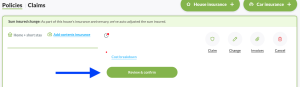
3. Review or update your insurance cover
- Carefully review your current insurance cover.
- Update the sum insured, excess and the other details to ensure your policy matches your current needs.
4. Confirm your details and make payment
- Verify all your personal and policy details.
- Proceed to make the payment to finalise the renewal.
After you’ve renewed
Once you’ve completed the renewal process, your updated policy schedule and receipt will be saved to your initio dashboard as well as emailed to you. We recommend checking your summary to ensure all details are correct and the coverage meets your requirements.
Continuous policy management
Enjoy the flexibility of managing your policy online:
- Make changes anytime: You can adjust your excess, sum insured amount, or type of insurance anytime through your dashboard.
- Easy claims process: If you need to make a claim, simply login to your dashboard and follow the steps. You will receive instant claim updates via email and through your dashboard.
Why renewal is important
Renewal is not just a routine task; it’s an opportunity to reassess your coverage and make sure it aligns with your current needs. Most importantly, it’s to make sure you stay insured. You should also ensure the sum insured accurately reflects the cost to rebuild your home. If you’re unsure about the rebuild value, read our Re-build value guide.
Viewing and customising your renewal options
To check the costs and options for renewing your annual policy without committing right away, our system makes it easy. Instead of sending traditional invoices, we provide a “Review & Confirm” button. By clicking this button, you can view the upcoming year’s costs and explore alternative options, such as different sums insured and excesses. This process is obligation-free, allowing you to review and customise your options at your convenience. You can return to this page and finalise your decision whenever you’re ready.
Got a monthly policy?
In this situation, you don’t need to do anything. On the annual anniversary of your policy we will send you an email letting you know of any upcoming price/changes. You only need to let us know if you DON’T want to proceed with the cover. We also recommend using this opportunity to review your policy. You can, however, do this any time throughout the year using the change option, which can be found on your dashboard.
We hope you enjoy the freedom and convenience of managing your insurance online with Initio. If you have any questions or need assistance, our support team is always here to help.
Policy record is showing as “not active” or has lapsed?
If the record for the cover has lapsed and is no longer available to renew, you can re-instate cover by taking out a new policy. Use either the “home insurance +” or “vehicle insurance +” options on your initio dashboard.
Frequently asked questions
Can I make changes before I renew?
Yes. Review your renewal documents carefully and make any required changes before completing your renewal.
What happens if I don’t renew my annual policy?
If your policy isn’t renewed before it expires, your insurance cover will end on the expiry date shown in your policy documents.
Not necessarily. Your renewal premium reflects the information we hold about your policy together with our current pricing and underwriting at the time of renewal.
Useful links
- Calculate your sum insured
- Why does my rebuild value change?
- Why has my premium changed?
- How Online Eftpos works with initio

Written by Megan Fisher, Head of Marketing at initio.
Megan has been with initio since 2022 and has over 20 years’ experience in marketing and product strategy. She works closely with initio’s claims and customer experience teams, giving her a first-hand view of how insurance works when customers need it most.