Search results for: {search_term_string}/get-quote/house-insurance-calculator
The cost to rebuild your home is constantly changing. To try and help with changing construction costs and other factors that may affect the rebuild value of your home, each year we auto-update your sum insured.
For Monthly payment policies the auto-update to your sum insured will be automatically applied once per year, at the anniversary of your policy. One month prior to the change we will notify you of the auto-updated sum insured and invite you to login to your dash to change the sum insured to an amount of your choosing. If you change your sum insured this amount will be locked in for the anniversary renewal of the policy. If you do nothing, then at the anniversary renewal (ie the following month) the sum insured will update to the amount we have advised, and new insurance cost will be charged to your credit card.
For Annual payment policies the auto-update will be applied during your renewal process, where you can further adjust the sum insured prior to confirming you renewal and making payment.
A change in sum insured affects the premium you pay. This is because a higher sum insured means more insurance cover, which equates to more premium to cover that risk. At the same time, your cover may have also had a premium rate or levy change. By selecting the ‘change’ icon in your dashboard, initio makes it easy to see how changes to you sum insured affect your premium. Its easy and responsive, and we are here to help if you need assistance.

What things can impact the rebuild value of my home?
- Supply chain issues and accessibility of materials.
- Changes in the cost of transportation and shipping.
- Inflation and interest rate changes.
- Changes in the cost of labour and in particular construction related wages.
- Cost of waste disposal
- Cost of compliance costs (eg council consents, heath and safety, insulation rules)
- Accessibility of the the property
This is not an exhaustive list but all of these are contributing to changes in the overall cost of constructing, rebuilding or repairing a home.
Changes in construction costs vary by region too due to the availability of labour, and also local rates.
So what sum insured do I use?
The auto-updated sum insured we do at your policy anniversary is a guide to your sum insured only. It does not account for your unique situation such as renovations or improvements to the home, or the accuracy of the sum insured your originally chose. We are not attempting to recalculate the insured value of your home, and you are responsible for choosing an accurate sum insured. If your sum insured is not right for you, it might not be enough to rebuild your home to the same size and quality.
Because the things that contribute to your rebuild value are constantly changing, it’s almost impossible for you to select a sum insured that will work for the entire annual insurance period. The best approach is to choose a sum insured that reflects the homes approximate rebuild cost and allows for demolition costs, escalation of construction costs and other site improvements (such as retaining walls, pools, sheds, fences).
We strongly recommend that you use your policy anniversary as an opportunity to review the sum insured of your home. You can use the SumSure rebuild estimator to help. This is a simple tool that can provide a quick and easy estimate of your home’s rebuild value, and at the very least you should use this tool.
Better still, there are skilled professionals that you can engage (at a cost) to provide a detailed report on the rebuild value of your home. Construction Cost Consultants are one of those, and can provide residential rebuild valuations
Learn more about working out your sum insured.
Please note you can only change a policy once it’s active, ie. the inception date is not still in the future.
Where do I start?
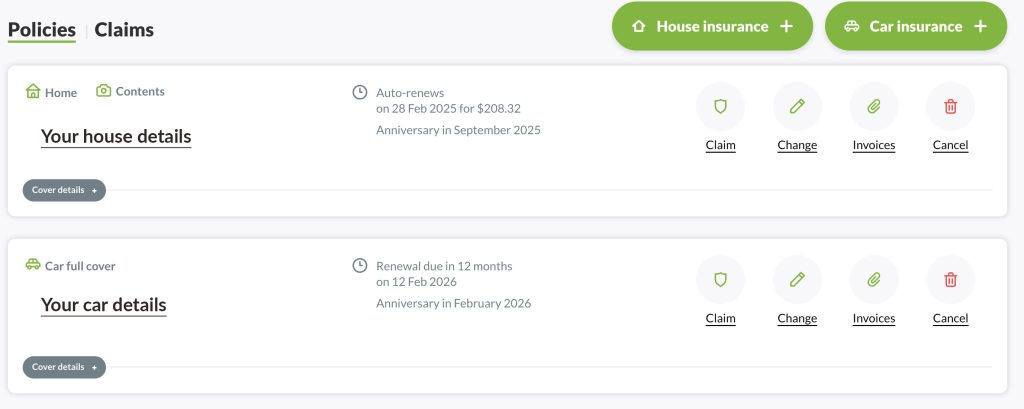
Changes are made to your policy online by logging in to your initio dashboard and selecting the “Change” button from the right-hand side action menu or one of the Quick Change buttons shown beneath the address by expanding the Cover Details option.
What can I change using this option?
Once you have clicked on the change button, proceed to the “Cover” section to make changes to your policy and select the relevant option.

You can now edit the following;
- Address where the vehicle is usually located
- Type of Cover – choose from Full Cover, Third Party Fire & Theft or Third Party Only
- Review agreed value
- Include or Exclude Roadside Assist (available on full cover only)
- Amend your current excess
- Review policy options of including/excluding drivers under 25 years old
- Review policy option of anticipated kms per year
What can’t I change using this option?
- A new (replacement) vehicle
- A new Main Driver
- Policy start date
- Payment frequency
To make changes to any of the above, it requires a new policy to be taken out. This is also a simple process by using the “vehicle insurance +” option on your initio dashboard. Once the new cover is in place, you can then cancel the original policy, a refund will be provided for any unused portion of the cancelled policy.
Learn more about how to change your payment frequency
- License/Registration Plate
If you have obtained a personalised plate or there is a change to your current vehicle’s registration, please contact our support team ([email protected] or 0800 763 929) for assistance to have that corrected on your policy.
- A new Owner (Insured Name)
If you have sold the vehicle, any new owner will need to take out their own insurance policy using their own details. If you just wish to make a correction to the Insured Name/Owner details, such as amending the spelling or changing it to your own business name, please contact our support team ([email protected] or 0800 763 929) for assistance to have that adjusted on your policy.
What about nominated drivers?
Aside from the main driver, we do not require you to nominate other drivers. However, If you have agreed to exclude drivers under 25 years of age and now wish to change that, you can do so using the change option (or vice versa).
Articles of interest
Meth contamination claims aren’t common, but when they do happen, they can be complex. Here’s a simple guide to how the process works with initio and what to expect.
When should I test for meth?
Regular testing isn’t an insurance requirement, but it’s recommended at key times:
- Between tenancies
- When purchasing a home
- If a tenant’s circumstances change and things seem suspicious:
- People coming and going at odd hours
- A new, unlisted person moves in
- Police raid the property
- Known gang associations
Types of meth testing (and costs*)
- DIY tests
- Purchased from retail stores or online. These tests use swabs and extraction solution and can be easily completed by the landlord or property manager.
- Easy to obtain an indication of contamination.
- Not able to provide robust results sufficient for insurance purposes.
- $100.00 – $150.00 for a pack with multiple test kits.
- Composite test
- Completed by a meth testing professional.
- One test result for multiple rooms – combines all results and provides a maximum theoretical level.
- $300.00 – $400.00, depending on the property size.
- Detailed test
- Completed by a meth testing professional.
- Each room is individually tested. One wipe is used per surface to confirm exact contamination levels.
- $500.00 – $3,600.00 depending on the property size/number of samples required.
Tip: Ensure your testing professional complies with the New Zealand Standards 8510.
The meth claim process
- The initial composite test comes back positive
- Detailed test confirms room-by-room levels
- The insurance claim is lodged, and the relevant documents are collected. As well as the testing results, we need you to supply information about the tenancy and support meeting the Landlord’s Obligations of your policy
- The claim is assessed, and could be accepted or declined at this stage
- Decontamination is arranged (by IAG-approved cleaners)
- Post-cleaning tests confirm levels are now below the required level
- Clearance certificate issued
- Remediation (e.g, new carpet, curtains etc where required)
- Property can be re-tenanted
Decontamination costs
These can vary widely, so initio will require two quotes.
For example, below are 2 quotes we obtained to clean a property:
- Provider 1: $12,063.50
- Provider 2: $22,218.00
Only hard, non-porous surfaces can be cleaned (e.g., walls, benches). Soft furnishings, carpet, curtains, etc. in the contaminated rooms must be removed and replaced.
Loss of rent cover
- Starts on the date of confirmed contamination
- Ends once the property is liveable again (usually after remediation is complete)
- Typical timeframe: 2 to 16 weeks (average is 7 weeks)
Final thoughts
Meth contamination isn’t the most common type of claim, but it can be one of the most disruptive. Being aware of the signs and testing at the right time can help you stay ahead of it, and if the worst happens, initio’s claims team is here to make the process as simple as possible.
Login to make a claim

Related Support articles
*Current average costs May 2025
You can cancel a policy yourself online any time through your dashboard, and you will be refunded the unused premium.
Simply log into your initio dashboard and select the ‘Cancel Policy’ option on the policy you want to cancel. You can then select the date to cancel the policy from, and you will be instantly shown the refund amount, which will be refunded to your credit card or account with five working days.
The most common reason for cancelling a policy is because the property has been sold, with the date for cancellation of the policy being the settlement date. We realise that the settlement date may have already passed or be yet reached. You can cancel the policy with effect from a date within a 30 day window, subject to the current period of your policy, ie the current paid month or if you pay annually, the current year. If you are trying to cancel more than 30 days ahead, you will need to wait till you are within the available window.
Once the policy has been canceled it will move to being an inactive policy, which can still be viewed from your dashboard and you can still make a claim for that time period of cover.
Troubleshooting: Why can’t I choose the correct cancellation date?
To cancel your policy for a future date, such as when you sell your property, follow these steps:
1. Check your renewal date
- If you want to cancel your policy next month, you might need to wait until your policy renews.
- For example, if it’s mid-July and your policy renews at the start of August, and you want to cancel in mid-August, you need to wait until early August when the policy renews.
2. Refund details
- You’ll get a refund for any unused portion of your policy after the cancellation date. The credit will be applied to the card initially used for payment, if this is not suitable please get in touch immediately to provide your preferred account details.
Example:
- Current Date: Mid-July
- Policy Renews: Start of August
- Desired Cancellation Date: Mid-August
What would you need to do? Wait until early August for your policy renewal. This ensures your cancellation goes smoothly and you receive any eligible refunds.
Pay online the easy and secure way
Just use your bank app on your phone to make the payment. It’s quick, safe, and you don’t need to share your banking details, making it one of the most secure ways to pay online.
Currently available to ANZ, ASB, BNZ, The Co-operative Bank and Westpac customers.
*Available on annual payments only.
How to make a payment
- Choose the online eftpos option from the payment screen when renewing your annual policy.
- Select your bank and enter your mobile number.
- Approve the payment request in your bank app.
That’s it! – the payment is made instantly if funds are available.
Key benefits
- Direct account-to-account transfers
- No need to share banking credentials
- Secure payment process
- Simple smartphone-based payments
Getting started
If you use your bank’s mobile app regularly, you shouldn’t need to do anything special. Just check you have the latest version of your bank’s app installed. Below are a few bank-specific requirements:
ANZ customers
- Download or update to the goMoney banking app.
- Have an ANZ everyday account (e.g. Go, Freedom, Business Current) or Flexible Home Loan account with sufficient funds.
- Contact your bank to register a verified mobile phone number with OnlineCode or ANZ Pay to Mobile.
Further information for ANZ customers
ASB customers
- Download or update to the latest version of the ASB Mobile app.
- Turn on “Receive payment requests” in Settings.
- Be Netcode verified within the app.
Further information for ASB customers
BNZ customers
- Download or update to the latest version of the BNZ app.
- Login with your BNZ access number and password.
- Use a BNZ transactional account e.g. YouMoney.
- Allow Push notifications, they aren’t required but make payments easier.
Further information for BNZ customers
Westpac customers
- Be registered for Westpac One and download or update to the latest version of the app.
- Use a Westpac Everyday, Simple Saver, or Choices Everyday account.
- Make sure your mobile phone number is registered and authenticated on your account.
Further information for Westpac Customers
The Co-operative Bank customers
- Download and set up the Co-operative Bank Mobile App.
- Keep it updated for smooth transactions.
Further information for Co-operative Bank Customers
Frequently asked questions
How secure is Online EFTPOS?
Online EFTPOS is one of the most secure payment methods available today. This is because it doesn’t ask you to enter your bank or payment details directly. Instead, you approve each payment through your bank’s app, adding an extra layer of security.
What is the maximum purchase limit for Online EFTPOS?
Each bank sets its own purchase limits:
| Bank |
Limit |
| ANZ |
$5,000 per transaction |
| ASB |
$30,000 per day |
| BNZ |
$12,000 per day |
| Westpac |
$5,000 per transaction (unless agreed otherwise) |
| Co-operative Bank |
Flexible daily limit depending on your account agreement |
You may also have specific limits set for your own account. Please contact your bank if you need to adjust those.
I don’t bank with one of these banks – when can I use Online EFTPOS?
The Online EFTPOS team is working to bring more banks on board. You can email [email protected] with your feedback or contact your bank directly to encourage them to join.
I don’t have the relevant bank app on my phone. Where can I get it?
Look for the ANZ, ASB, BNZ, Westpac One, or The Co-operative Bank app on the Google Play Store (Android) or iTunes App Store (iPhone).
How long do I have to approve my payment?
You have 4 to 7 minutes from the time the payment request is sent to approve the transaction in your bank app.
I didn’t receive a payment request in my banking app.
- Check you’re using the latest version of your app.
- Confirm you have enough funds.
- Allow up to 40 seconds for the request to appear (try refreshing or logging out/in).
- Double-check the mobile number linked to your bank app.
- Ensure the relevant payment settings are enabled in your bank app.
If you still have issues, contact your bank or email [email protected].
Why is my mobile number required?
It matches you to your bank account, so you don’t need to enter card details.
How long does a payment take?
Payments are processed instantly if funds are available.
What about refunds?
Refunds for payments made to your initio account will go back to the same account used for the original payment.
Related articles:
We do our best to keep the information on our website about Online EFTPOS current. However, we can’t promise that everything is always accurate, complete, or up to date, and we can’t guarantee that it will meet your specific needs.
For the latest and most reliable information, we recommend visiting either your bank’s site or Worldline’s Online EFTPOS support page.
Your safety on the road is our priority, and we’ve taken comprehensive measures to ensure you’re covered in every situation. Here, you’ll find everything you need to know about our optional cover for roadside assist service.
Roadside Assist Overview
Initio, backed by IAG, is committed to providing comprehensive support to its existing customer base. Our partnership with First Rescue enables us to offer a wide range of roadside assistance services. Whether you’re facing a flat battery, lost keys, or a breakdown, our support team is always here to help.
With our new Roadside Assist portal, getting back on the road has never been easier:
Roadside Assist portal
You can also reach Roadside Assistance at 0800 694 555.
Roadside Assist Services Include:
- Jump Start & Battery Replacement
- Breakdown Tow
- Keys Locked & Lost Support
- Wrong Fuel Assistance
- Car tyre Services
- And more!
Please note that some exclusions apply, such as unattended vehicles, towed vehicles such as boats, trailers or caravans, vehicles bogged down on non-public roads, or any vehicle exceeding 3.5 tonnes.
Roadside Assist is only intended for breakdowns, lost keys, and similar issues. Don’t use this service if you’ve had an accident.
How to Add Roadside Assist Cover
Whether you’re an existing customer or new to Initio, adding Roadside Assist Cover is a breeze. Roadside Assist can be added to your policy (full cover only) for a nominal fee, the details of which will be visible once you include it in your coverage. Here’s how:
For Existing Initio Customers:
- Log into your Initio dashboard.
- Find your vehicle policy section.
- Modify your policy to include Roadside Assist.
- Confirm the addition, and you’re all set!
For New Customers:
New to Initio? No worries! Simply add Roadside Assist to your vehicle policy as you set up your account with us.
Please note:
- Vehicle cover through initio must be paired with other insurance policies and cannot be purchased as a stand-alone option.
- Roadside Assist is only available with full cover vehicle cover.
Emergency Assistance
Now help is just a few taps away. If you’ve purchased the new Roadside Assist Online service, getting back on the road has never been easier:
Roadside Assist Online
If you are in an emergency and need immediate help, you can also call the 24/7 helpline 0800 694 555.
What about in the case of an accident?
- Always inquire about the well-being of everyone involved.
- Arrange a tow ASAP, the tow is covered under your vehicle policy if you have full cover on the damaged vehicle.
- Advise the police within 24 hours if anyone is injured.
- If no injury, you must give your name and address to any Third Party (and collect theirs). Inform the police within 48 hours if you cannot find the Third Party.
- If an animal is injured, advise the owner or call the SPCA on 0800 447 722.
Lodge your claim online to get a claim underway, or call us on 0800 763 929 if you need urgent assistance in relation to a vehicle collision.
Accommodation, Repatriation, Taxis:
Please be aware that these services are not included in your roadside assistance package; however, they may be covered under the terms of your specific vehicle policy.
You can find more information about all of our policy wordings here
Your safety is our priority. Keep this page handy for any roadside emergencies, and know that Initio is always here to help!
Related Articles
Fence blown over – May 2018
Background:
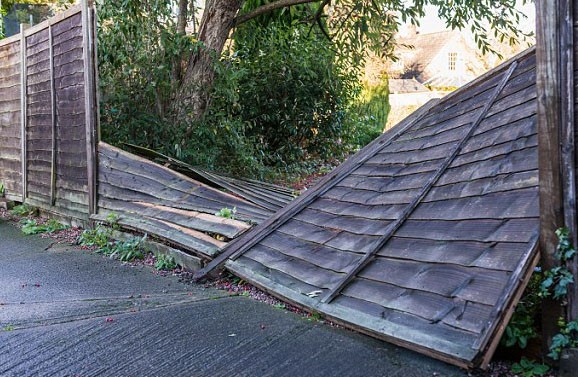
During a severe storm in Auckland, Max’s front fence blew over, snapping the posts off at the ground. After the storm cleared, Max attempted fixing the fence, but it was obvious that it was beyond repair. Max called in the professionals and got a quote to replace the fence.
Claim Process:
Max logged into his dashboard on the Initio website to tell them about his new claim. While completing the details of the claim, he uploaded a photo of the smashed fence and a quote to replace it.
Outcome:
Initio were able to review and pay Max’s claim, straight into his bank account, so that he could get the fence replaced the next day.
All claims are different, and they are assessed on their own merits and facts. The above profiles do not imply a guaranteed approached all such claims
With the exception of correcting the Insured Name or Interested Party, please note you can only change a policy once it’s active (ie. once effective date is reached). If you’ve incorrectly set up other details for a policy in advance, you must cancel the policy and do a new one with the corrected details. We will give you a full refund for the original policy.
You cannot switch from a monthly policy to an annual one, but you can change from an annual to a monthly policy at renewal. Changing from monthly to an annual cover would require taking out a new annual policy and then cancelling the original monthly cover. For more details, check out our article on ‘Switching Payment Frequency‘.
Where do I start?
Changes are made to your policy online by logging in to your initio dashboard and selecting the “Change” button from the right-hand side action menu or one of the Quick Change buttons shown beneath the address by expanding the Cover Details option.
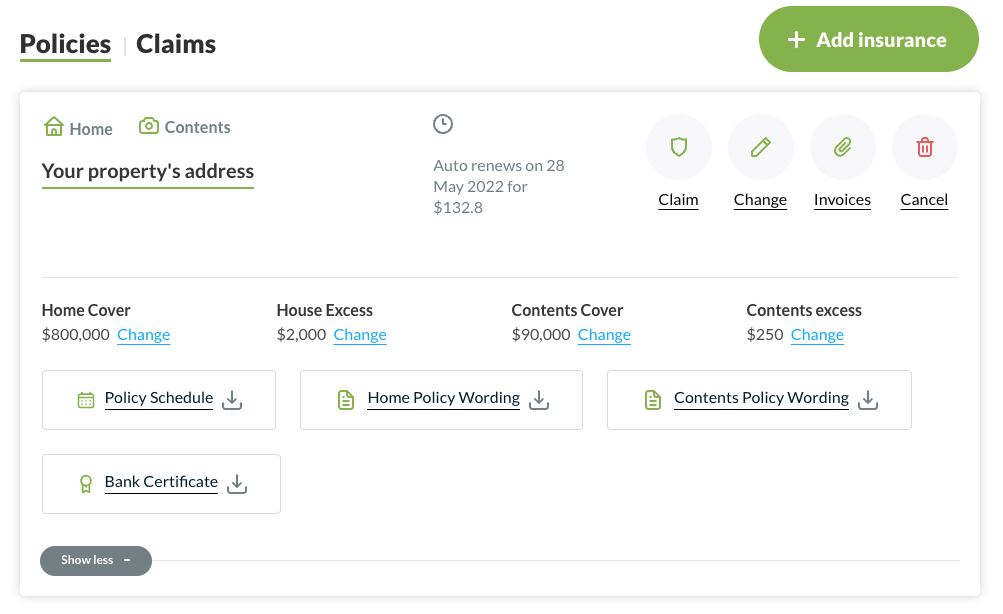
Changing cover?
Click on the “Cover” button to make changes to your policy and select the relevant option;
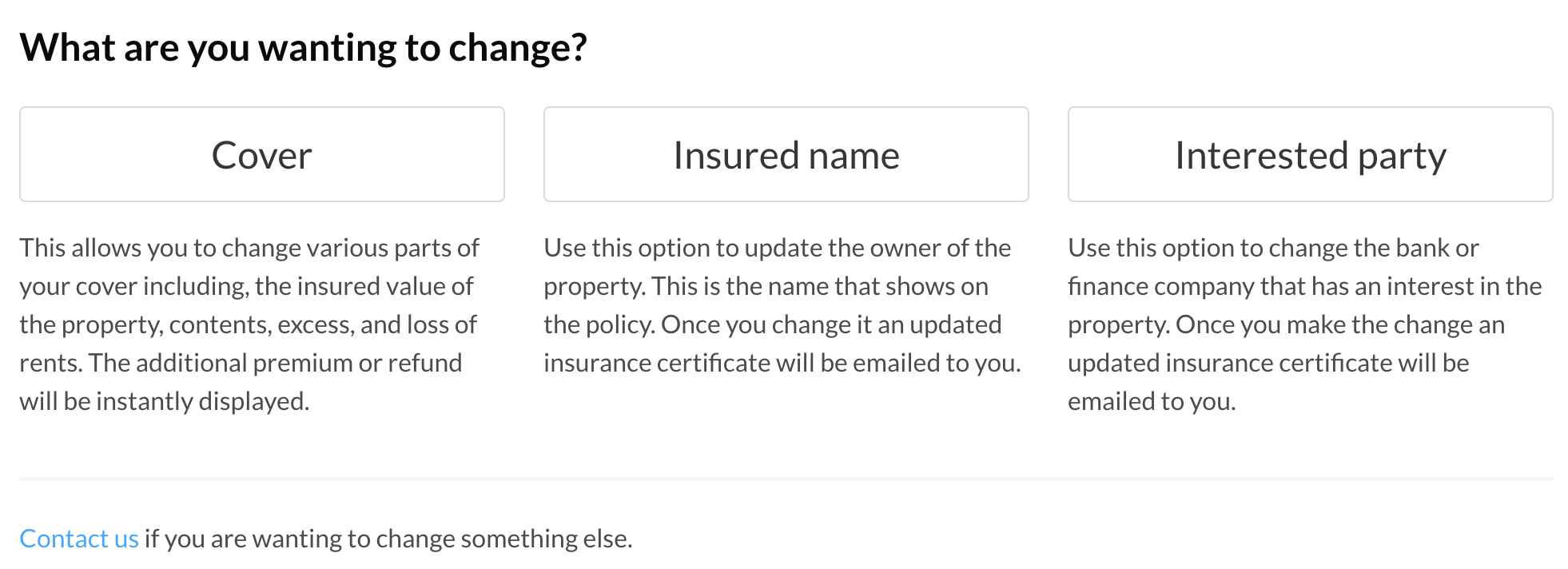
“Cover”
- Property Type, eg. From owner occupied to rental or holiday home, etc. For example, if you initially insure your home as owner occupied and partway through the year you decide to rent the home out, you can easily amend your cover to a landlord policy.
- Sum Insured
- Add or remove contents section
- Add or remove specified items
- Amend your current excess
- Adjust ‘Loss of Rents’ cover
Not living in your own home anymore and have turned it into a rental?
Simply click on the “Property Type” drop-down box and change it to ‘Rental Property’. If you need help deciding on which policy you need, please Contact us or refer to our support page here.
You can also use the Property Type change option to switch back to an Own Home (owner occupied), or change to our Holiday Home product (your own holiday home).
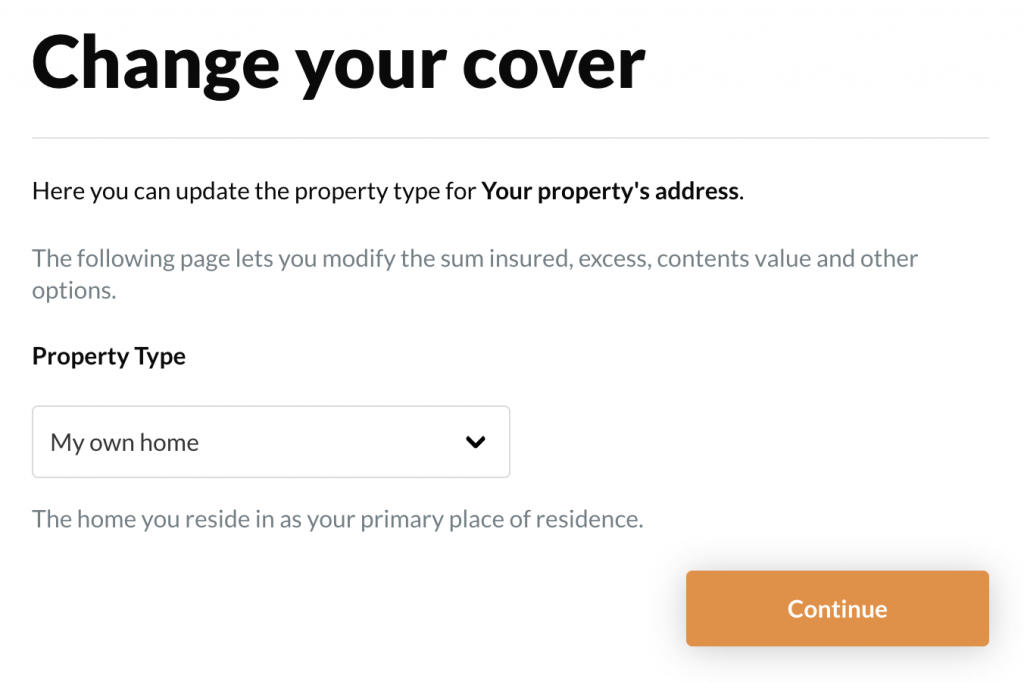
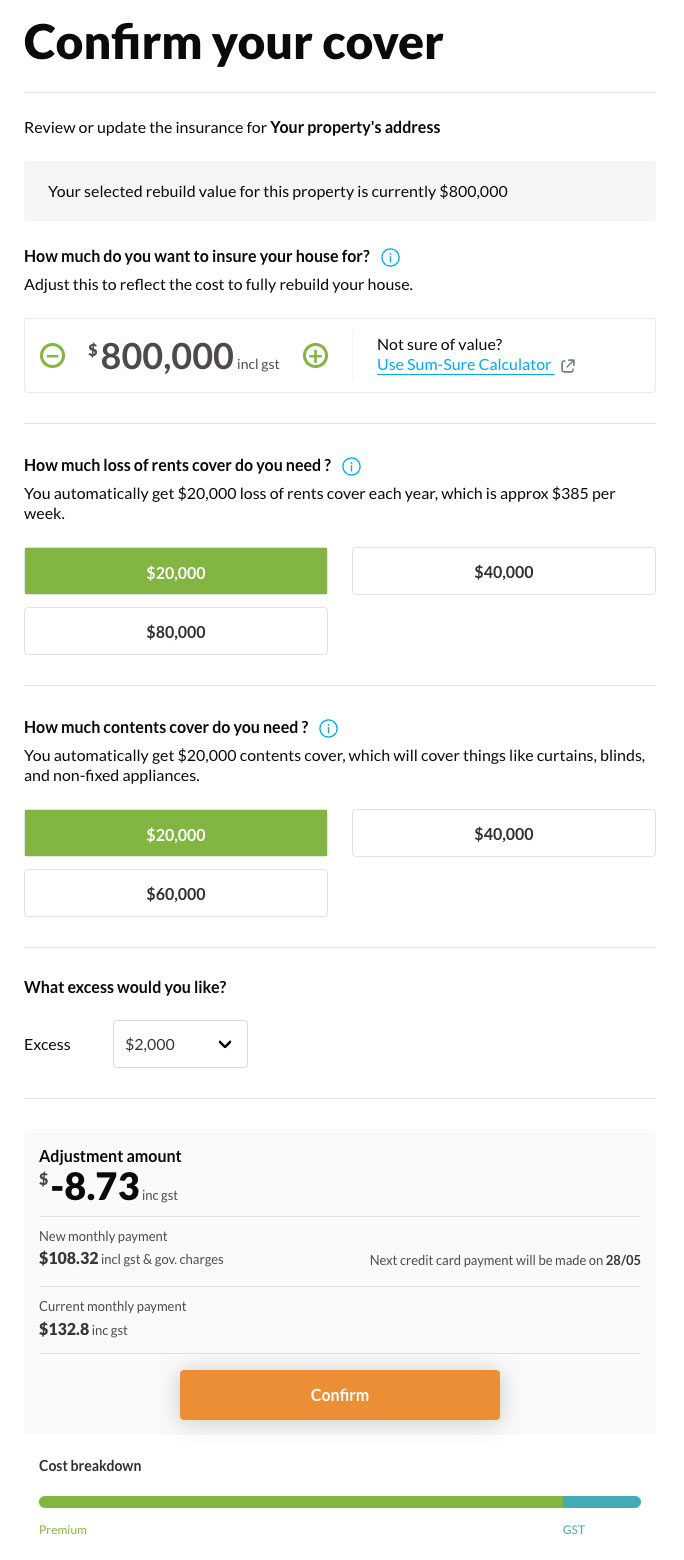
Need to increase your replacement value or adjust your excess? Add Contents?
Click continue from the Property Type page and here’s where you can make these types of changes.
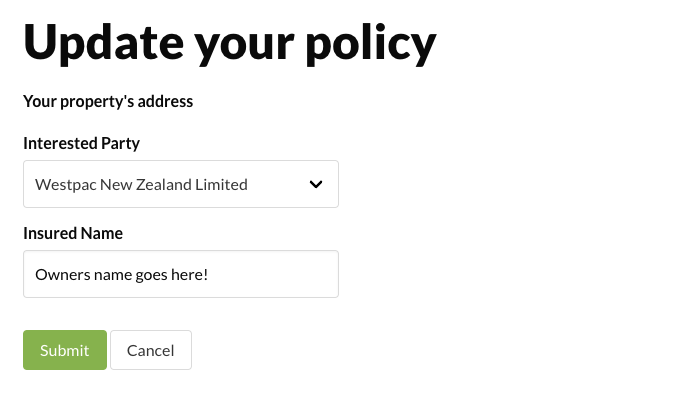
Changing Insured Name or Interested Party
“Insured name”
- You can correct the Insured Name here, but please note if there has been a change in ownership (entities), a new application/policy will be required.
“Interested Party”
- If you’ve paid off the mortgage and want the bank’s details removed, or you’ve re-financed/mortgaged the property and want to change or add the name of the bank/financial institute.
Need to correct an insured name spelling or add a spouse? Change the name of the recorded bank? Click on the “Insured name” or “Interested party” buttons. Select whichever Interested party applies (select ‘other’ if yours is not listed) and enter either your name, company or trust name (whoever owns the property) as your Insured name then click ‘Submit’.
After you have made your changes, click ‘confirm’ at the bottom of the page to proceed to the confirmation and payment sections, where you will either be refunded or required to pay a difference based on the changes made.
Review and confirm
Review your new cover details under ‘Confirm Change’, and the smart quote system automatically adjusts the price of your policy according to your changes. If a refund is due, we’ll process this within 1-3 working days.
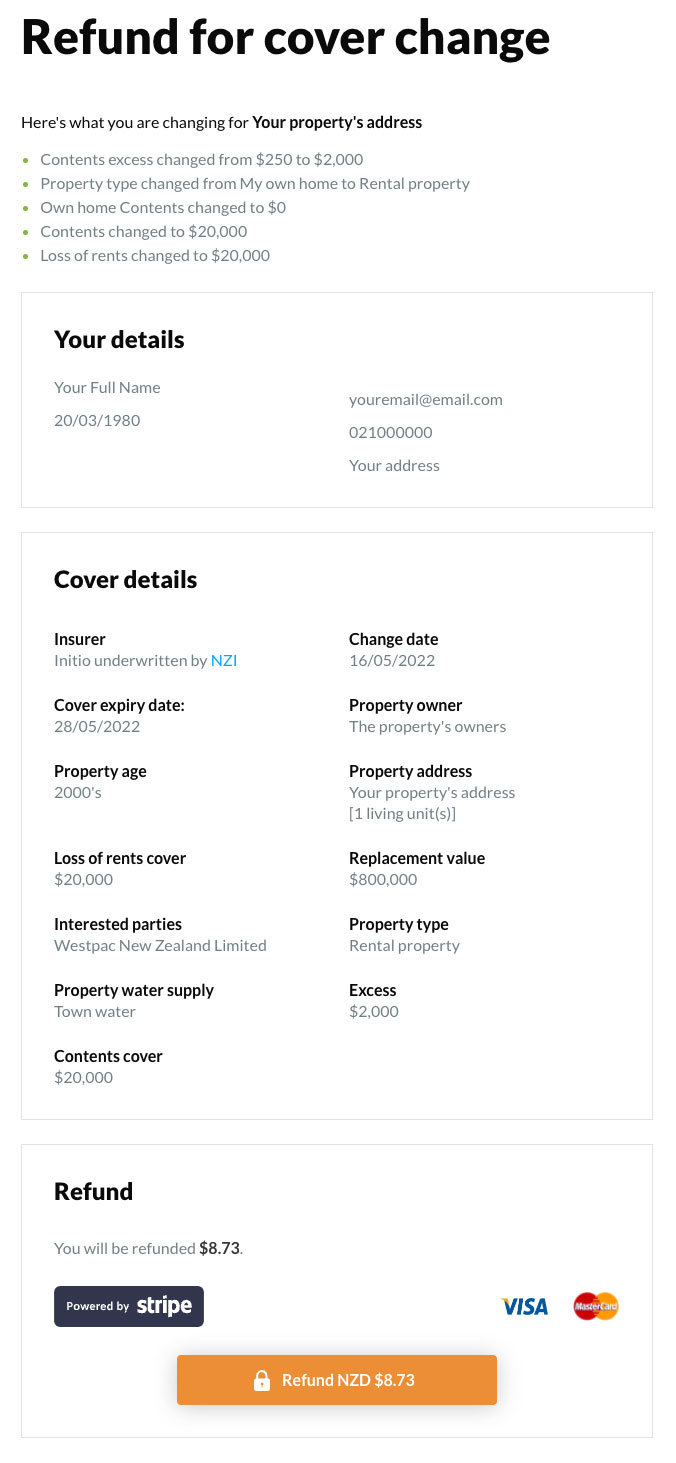
You can make more than one change at once. Each time you make a change, the premium will recalculate and show you any difference in cost (calculated up to the policy renewal date). If you change your mind, cancel the transaction and no changes will occur. If you want to proceed with a change, click confirm and pay the additional premium (or confirm the refund). Alterations take effect immediately. A current certificate of insurance is also then immediately available on your dashboard.
After making changes, your online certificates and documentation will be updated and a copy sent to your registered email address.
Still haven’t found the answer you’re looking for? Here are some frequently asked questions that might help:
FAQ’S
Q. I’ve accidentally put the wrong start date on my policy, can I change it now?
A. Unfortunately, we are unable to alter the inception date of a policy once it’s been purchased. You can, however, cancel the policy from your dashboard back to the original inception date and re-purchase the policy (from your dashboard) with the correct date. Our system will automatically provide you with a full refund from the original policy.
Q. How do I amend or correct the home floor area on a policy I have already purchased?
A. Please contact our support team to make this amendment for you – [email protected].
Q. The water supply on my property is incorrectly noted, how do I change that from Town to Own Supply or from Own Supply to Town?
A. Please contact our support team to make this amendment for you – [email protected].
Q. How do I correct the property address on a policy I have already purchased?
A. Please contact our support team to make this amendment for you – [email protected].
Q. How do I change my details or password on my account?
A. From your dashboard, click on the “Account” option in the top-right corner of your screen and select “Profile”. Here, you can update your email address, phone number, postal address, and change your password to something more personal.
If you’ve forgotten your password, click the “Forgot my password” option to reset it. Simply follow the instructions to complete the process.
As a NZPIF member, you’ll receive the following benefits:
- Competitive House Insurance Premium
- Inspections required only every four months (rather than three)
Key requirements for accessing the initio offer:
- You must be an active NZPIF member or have an active membership with an individual association to qualify.
Please contact your local NZPIF branch to learn more.
If you are unsure whether you have a NZPIF membership loaded to your initio account, please email [email protected].
No. Through our internet-first approach we aim to provide competitive premiums across our house, car and contents insurance products – regardless of quantity or type.
IAG, which backs Initio, has shared insights from their latest Wild Weather Tracker.
The May 2024 update provides:
- An in-depth analysis of significant weather events across New Zealand, highlighting climate impacts on housing, with 90% of New Zealanders seeking flood information when buying homes.
- A six-month weather snapshot: Nine major storms resulted in 6,712 claims, with Canterbury lodging the most.
- Weather-related claims percentages across NZ.
- Insights into understanding insurance premiums.
- The interplay between wild weather and the housing market: House claims made up 62% of weather-related claims.
- Natural hazard risk research.
- Preparation tips for extreme weather.
This report aims to keep you informed about current weather trends and their potential implications. Stay prepared and updated with comprehensive weather tracking.
For more details, visit IAG Weather Tracker.
initio launches its rental property insurance site on 01 November 2010. Be here for excellent cover and sharp premiums. initio – an online insurance revolution in New Zealand. The online site where you can manage your own insurances online. No phone calls… no paperwork
Another well-earned award
Last night our friends and colleagues at Frank Risk were recognised with the Australia New Zealand Institute of Insurance and Finance (ANZIIF) Small-Medium Broking Company of the Year Award. This is the second year in a row they have won the award.
Frank Risk Management is very special to the team at initio, as the co-founder, Rene Swindley, is also the co-founder of initio. We are very proud of the achievements of Rene, Andrew Newman and the rest of the Frank team.
Also, congratulations to our partners, NZI, for taking out the Intermediated Insurance Company of the Year Award.

Your home insurance policy does not cover you for construction related damage while your are renovating your home.
For example, if a tradies skill saw catches on fire and burns part of your home your home insurance policy would not pay the claim. Or if you removed a window, and an unexpected storm passes through causing water damage to your wall linings and carpets, you wouldn’t be covered.
If you are making any structural additions or alterations to your home, including the removal of roofing and exterior cladding, it is likely you will require a seperate contract works policy.
Before you (or your builder) pick up a hammer, flick us an email with details of your project or complete the following Contract Works Fact Finder and we can advise you if additional cover is required.

Most home insurance policies will not cover you for construction related damage.
For example, if a tradies skill saw catches on fire and burns part of your home your home insurance policy would not pay the claim. Or if you removed a window, and an unexpected storm passes through causing water damage to your wall linings and carpets, you wouldn’t be covered.
If you are making any structural additions or alterations to your home, including the removal of roofing and exterior cladding, it is likely you will require a seperate contract works policy.
Before you (or your builder) pick up a hammer, flick us an email with details of your project and we can advise you if additional cover is required.

There’s replacement cover for most medical assistance equipment you own and keep at your residence under our Own Home Contents cover (owner-occupied policy). This includes hearing aids, insulin pumps, spectacles, dentures, and mobility aids such as wheelchairs and walkers. These items are automatically covered under your main contents sum insured and don’t need to be listed separately. They’re insured for sudden and accidental loss or damage, subject to the policy’s standard terms and conditions. Please note that cover applies only within New Zealand, so we recommend arranging travel insurance if you’re heading overseas. Your chosen contents policy excess applies to any claim for these items.
To see a list of contents items that need to be listed, see here.
Releated support articles:
What content items do I need to specify?
Are there limits to how much I can claim for my contents?
How do I add contents to my insurance policy?
At Initio Insurance, we require an agent or a trusted representative physically present at the property for inspections. This ensures a thorough evaluation of the property’s condition and facilitates real-time reporting, serving as your on-the-ground resource.
Advantages of having an in-person representative include:
- Real-time condition verification and data reporting during the inspection process.
- Being your dedicated eyes and ears on the ground, diligently checking the property’s condition.
- Early identification of any potential issues, damages, or repairs that could potentially be missed in a purely remote inspection.
However, we understand there may be special circumstances such as illness or lockdowns where remote inspections become necessary. These should be exceptions rather than the norm. In such cases, a trusted representative or official agent’s physical presence during the inspection is critical to maintain the assessment’s accuracy and comprehensiveness.
Looking ahead, we’re mindful of emerging technologies that could potentially streamline remote inspections. However, as of now, the value of in-person inspections is paramount. Always remember that our advice serves as a guideline, not an inflexible rule. Each property and situation may require a different approach, and decisions should be tailored to your specific circumstances and needs.
Learn more about how often you need to inspect your property
Heading out for a holiday or needing to leave your home for a bit? There are some easy steps you can take to make sure your home doesn’t become a victim to unwanted attention without you.
Take holiday precautions
When you’re planning to leave your home for a holiday or any reason, there are practical steps you can take to keep it safe and secure. It’s not just about locking doors or turning off appliances. We’ve got straightforward advice to help you relax, knowing your home is looked after while you’re away. Here’s how to prepare your property for your absence, which also helps in maintaining your insurance cover.
Engage a Trusted Person
Ask a neighbour, friend, or family member to look after your property. They can collect mail, water plants, and make the property appear lived in. This is important for keeping your home safe and meets the requirement for regular check-ups, especially for holiday homes.
Utilise Smart Home Technology
Investing in smart home technology can offer peace of mind while you’re away. Smart lights can be programmed to turn on and off at set times, mimicking the presence of someone at home. Smart water sensors can alert you or a trusted contact to any potential leaks, reducing the risk of water damage.
Garden and Exterior Maintenance
Ensure your garden and the exterior of your property are well-maintained before leaving. Overgrown gardens can signal an unoccupied home, attracting unwanted attention. If you’re away for the long haul, maybe hire someone to look after your gardens to keep things looking loved.
Secure Valuables
If possible, secure valuables in a safe or take them with you. This reduces the risk of theft and ensures that your most precious items are not left unattended in an empty property.
Update Your Contact Information
Ensure your insurance provider has your current contact information, including an emergency contact number. This allows us to reach you promptly if any issues arise with your property while you’re away.
Review Your Policy
Before leaving, review your policy details to ensure you understand your cover and any actions you need to take to maintain this coverage. If you have any questions or need clarification, it’s a good idea to contact us for peace of mind.
By following these steps, your home will remain secure, ready for your return from any adventure.

Make sure your unoccupied property qualifies for cover
On the subject of taking holidays, perhaps you’re wondering about cover for your unoccupied property? If your property is left empty, vacant, or unoccupied, you don’t need to notify us. But there are some conditions.
- For rental and owner-occupied properties, your coverage remains unchanged for up to 60 consecutive days of being unoccupied. However, if unoccupied for over 60 days, a standard excess of $5,000 applies to all claims, reduced to $1,000 if there’s a break-in with a professionally installed (and monitored) alarm*.
- For owner-occupied homes, after 60 days, coverage is limited to major risks like fire, explosion, and natural disasters, excluding theft and vandalism.
- Holiday homes can be unoccupied for over 60 days, but require regular inspections, maintenance, mail clearance, water shut-off, and secure locking. Failure to meet these conditions results in a standard $5,000 excess, reduced to $1,000 for break-ins with a professional alarm system* that provides external alerts.
*Surveillance cameras only do not meet this criteria – the system needs the ability to provide an external alert (audible or direct to a monitoring company)
OTHER ARTICLES OF INTEREST
This article is only meant as a general guide. We recommend reading the full policy wording for the full details of the coverage.
Do you know what goes on in your property?
One of initio’s first ever claims was a large fire caused by a child playing with matches in a wardrobe. While this is rather cliche, it does happen, and the consequences can be very serious. Fortunately, working smoke alarms meant no one was injured, and initio picked up the tab for the damage to the house.
Please use this as a friendly reminder that all your properties should have working smoke alarms which are tested regularly.

It’s common for older houses to have un-consented garages. Usually this is because a garage was added to the house without a full code of compliance being approved. This doesn’t necessarily mean the garage isn’t up to standards and can’t be covered.
To cover an un-consented garage it will need to meet the below requirements:
- Garage is structurally sound, well maintained and has no known defects.
- Structure would have met building requirements at the time it was built.
- If code of compliance was requested, it would have been issued.
If you can meet the above then it’s likely we can provide cover on our standard terms. However, if there’s a loss that’s directly cause by the garage’s non-compliance or because it isn’t built to standards, it may not be covered.
You’ll also need to disclose the un-consented garage on your application.
For more information see our full guide on insuring un-consented houses here.
Other articles of interest
Do you need confirmation of cover?
What is initio and how does it work?
Initio’s policy wordings
What we do not cover at initio
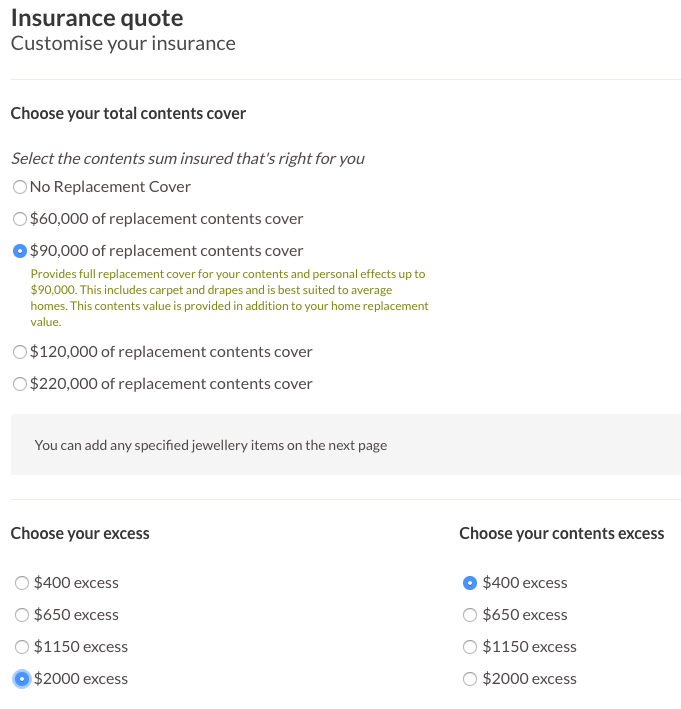
Often when we talk to our customers, and they tell us how much they love initio; unfortunately that can be followed by a but…. The most common ‘but’ we hear is that they don’t want the same excess for their home and contents. We agreed that was a reasonable request and put our developers to work.
The benefit of having an in house development team is that we can make changes on the fly. So even though this wasn’t a schedule update; we found some time between two larger development projects and got it done. The best part about making a change like this is the validation. The very next day after rolling out the update, we had an exisiting customer log in to their dashboard and insure their own home and contents. They were able to choose a $2,000 excess on their home, and a $400 excess on their contents.
Initio loves satisfied customers, which is why when something isn’t quite right, we make the necessary changes to improve it. And on that note, it is back to our next project – monthly payments.
Do you know what goes on in your property?
One of our customers suffered a devastating house fire at their multi-unit rental property. Here are some basic proactive steps you can take to protect your property.
- Check power points for overloading and consider installing additional power points
- Install safe and efficient heating sources such as a heat pump
- Remove curtains from kitchen windows as these are excellent fuel sources for fires
- Have registered electrician check the condition of the electrical wiring if there are any concerns.
Please use this as a friendly reminder that all your property should have working smoke alarms which are tested regularly….. And never let your kids play with matches.

Initio is loving local real estate ‘disruptor’, Hermitty, the new website that helps people save time, stress and thousands of dollars by swapping homes permanently instead of selling them.

Swapping homes creates an even playing field. It doesn’t matter what each property is worth, it only matters what the value gap is. The difference between agreed house values may be addressed by a cash payment or you could decide to include chattels or even a boat. It’s up to you how you swap.
Thought about trading that inner-city apartment for a lifestyle block further South? Why not list your property and see what future home may be out there? It’s free to list and you pay a one-off fee of $98 to chat to as many home owners as you like. They’re like a dating agency for homeowners!
Hermitty is for everyone who owns a home and wants to swap. It’s all about the chat so no legal agreements happen on the site. Once you’ve found someone to swap with then all the contract negotiation happens directly between the two parties and their lawyers.
Find out more about Hermitty here.

Identifying and eliminating risks in your holiday home is important for the ongoing enjoyment of your property.
In 2013 the biggest cause of loss in holiday homes for Initio was water damage. This occurred in a number of cases where leaking or burst pipes caused significant damage while properties where unattended. Unfortunately this is only discovered when the would-be holiday makers arrive at the property to start relaxing.
Risk management includes prevention of loss or damage as well as general up keep of your property, our top tips for counteracting loss include:
- Turn off the water at the mains whenever tenants and family leave the property for periods of more than a week
- Clear guttering yearly
- Unplug your television, oven and other appliances to protect them from power surges
- Respond immediately to any concerns that tenants or visitors may have about the property’s condition
- Visit the property at least every 6 months to check for any signs of damage or run down structures, and repair if applicable
Be sure to practice these tips throughout the 2014 insurance period so that you can look forward to your next break.
Choosing the right tenant for your property
Choosing who you have living in your property can be one of the most stressful parts of being a landlord. Your property may have lot of your own time, effort, and finance in to getting your property just right, and having a “bad tenant” can put this all at risk.
Having insured against deliberate or malicious damage by tenants, we have seen our fair share of claims. From tenants have been just a bit reckless with the property, to the extreme of taking a golf club to the walls.
While having insurance will help get your property back to where it should be, it’s better to avoid the headache altogether by getting the right tenants in place. To help with this, we have prepared 3 tips for selecting the right tenant:
1. Beware of negotiators
Some negotiation can be expected on items such as dates, rent, or lawns. When the tenant is trying to negotiate down a bond, it can raise questions as to their financial position and cash reserves. Similarly, if they start haggling on the credit check or overdue payments, this may be a sign of trouble to come.
2. Rental property is a business
It can be tempting to rent your property to a friend or relative. You know the tenant, and don’t have to hassle with time consuming background checks or other formalities. However if something goes does wrong, you may find yourself in the tough spot of having to take a dear friend or relative to the tenancy tribunal or losing out on income.
3. Watching for the signs
When it comes down to choosing whether or not to select a tenant, there may be some red flags (frequent movers, no professional references, urgency to secure the tenancy) which could be explained. Others – such as wanting to pay in cash, or providing incorrect information/fake references – are a clear sign that this is not the best tenant for the property. Being familiar with the red flags will help you make the best decisions in who you let your properties to.
These points are a general view from claims that Initio has seen over the years. If you have specific queries about a tenant or application, or for further advice on tenants and property management, your local Property Investors Association is a great starting point.
AA Financial Strength Rating
We know that the most important thing for our customers is knowing that we have the financial strength to be able to pay their claims.
In accordance with the Insurance (Prudential Supervision) Act 2010, we provide you with updated information on our financial strength.
Initio Limited policies are underwritten by IAG New Zealand Limited (IAG). IAG has received a financial strength rating of AA from Standard & Poor’s (Australia) Pty Ltd, an approved rating agency.
A rating of AA means IAG has a ‘very strong’ claims-paying ability.
The rating scale for S&P Global Ratings is:
| AAA |
(Extremely Strong) |
| AA |
(Very Strong) |
| A |
(Strong) |
| BBB |
(Good) |
| BB |
(Marginal) |
| B |
(Poor) |
| CCC |
(Weak) |
| CC |
(Very Weak) |
| C |
(Extremely Weak) |
| D |
(Default) |
| R |
(Regulatory Supervision) |
| NR |
(Not Rated) |
Note:
The Ratings from “AA” to “CCC” may be modified by the addition of a plus (+) or minus (-) sign to show relative standing within the major ratings categories.
The rating scale above is in summary form. A full description of this rating scale can be obtained from www.standardandpoors.com.
In its Annual Solvency Return filed with the Reserve Bank of New Zealand, IAG New Zealand Limited had a Solvency Margin as at 30 June 2023 as follows:
| |
$m |
| Actual Solvency Capital |
782.1 |
| Minimum Solvency Capital |
501.8 |
| Solvency Margin |
280.4 |
| Solvency Ratio |
155.8% |
Accident loss claim – November 2017
Background
Simon took out a landlord’s insurance policy with Initio for his property in Palmerston North in September. Not having used Initio before and only having one policy, he was like many clients and a bit unsure how his policy would respond if he had a claim. Two months after his policy inception date he got his chance to find out. Simon received a call from his tenant advising his daughter when going into the shower had slipped and crashed through the shower door.
Claim Process
Simon phoned a repairer straight away and organised them to come out and provide a quotation for a replacement door. He took some photos of the damage and called initio. Initio advised Simon to lodge his claim online and send through copies of the photos and quotation he had obtained from the repairer. Simon’s policy protects him again sudden and accidental loss to his property. The damage to the shower door was consistent with a sudden and accidental loss and he knew the exact time of loss the damage happened.
Outcome
It really doesn’t get more straightforward then this. Simon provided all the information required when lodging his claim. From the photos he supplied his insurer were able to assess the damage. After his policy excess was deducted a payment was made into Simon’s nominated bank account for repairs and replacement of the shower door. This claim was lodged and settled within 24 hours for just under $1,000.

All claims are different, and they are assessed on their own merits and facts. The above profiles do not imply a guaranteed approached all such claims
Until the government changes the standard, contamination over the current 1.5mg/100cm2 limit will trigger a landlord insurance claim.
It is concerning that the Real Estate Agents Authority moved so quickly to only declaring limits over 15mg/100cm2. Continue to do your due diligence when purchasing property as contaminated homes (over 1.5mg/100cm) are untenantable and uninsurable.
Status quo remains at Tenancy Tribunal post-Gluckman report
The Tenancy Tribunal has published its first orders on methamphetamine since the Gluckman report sent shockwaves through New Zealand last month.
The orders have been eagerly anticipated after the Prime Minister’s former Chief Science Advisor published a report last month saying that there was no evidence third-hand exposure to methamphetamine caused adverse health effects.
As a result, Housing New Zealand and the Real Estate Agents Authority quickly established new contamination levels of 15 micrograms/100cm2 for their businesses.
But it appears the status quo will remain at the Tenancy Tribunal until the Government establishes new ‘official’ standards in this contentious area.
All six orders published since the Gluckman report was released on May 29 follow Standards New Zealand’s NZS 8510:2017, which has a contamination level of 1.5mg/100cm2.
Only one Tenancy Tribunal order, application number 4128761, referenced the Gluckman report.
“There is currently some debate about the health impact of methamphetamine however I agree that the use of premises for an unlawful purpose is something to be discouraged,” the adjudicator wrote.
So it appears it’s business as usual for landlords and property managers until any legislative changes are made in this space.
For more information, read the full tenancy.co.nz article here.
Want to pay monthly but prefer not to use a Credit Card? Our card option also works with Visa Debit Cards
Most standard accounts with New Zealand banks offer the option to link a Visa debit card to an ordinary bank account. Debit cards work like credit cards but use the money in your connected bank account, avoiding interest fees. They can be used for:
- Contactless payments in-store
- Online shopping
- Overseas purchases and ATM withdrawals
You can control your debit card options, such as enabling or disabling contactless payments. Debit cards are useful for paying policy premiums with Initio, either monthly or annually. Each bank has its own criteria, fees, and application processes.
Contact your bank for further information on how to set up a Visa debit card should you wish to use this option.
This information provides general guidance. For the latest details on fees and conditions, please check each bank’s website.
Useful links
How can I pay my premium?
How does monthly insurance work?
Switching payment frequency
Can I pay with direct debit?